News archive
2023 / v.19 2022 / v.18.9 2021 / v.18 2020 / v.17.4-7 2019 / v.17.0-3 2018 / v.16 2017 / v.15 2016 / v.14 2015 / v.12 2014 / v.11 2013 / v 10.1-7 2012 / v.10 2011 / v.9.1-4 2010 / v.9 2009 / v.8 2008 / v.7 2007 / v.6 2006 / v.5 2005 / v.4.5-6 2004 / v.4 2003 / v.2-3 2002 / v.1
"We teach senior leaders how to hit their ecommerce goals."
E-commerce marketing consulting agency
2024
- set of design themes in pastel colors
- Install a new set of pastel themes for your catalogs from that page
2023
- MyBusinessCatalog v 19.2
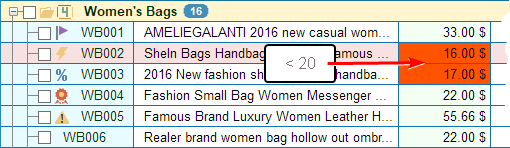
- Conditional color formatting of cells
- Fixed an error when searching with brackets
- Fixed bookmarks menu
- Many small improvements and optimizations
- MyBusinessCatalog v 19.0
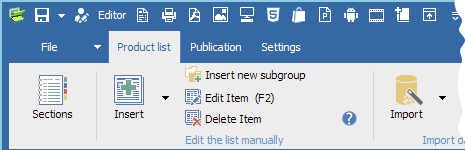
- New subgroup design
- New edit fields
- The long edit field appears only for the subgroup
- Icons and the tree structure are always in the left column
- Fixing column scrolling (click on the column header to adjust)
- A lot of improvements in product list editing
- Reworked product gallery design
- Hidden goods highlighting
- Customizable Quick Access Toolbar
- Collapsing the command ribbon to optimize workspace
- Easy access to bookmarks in large lists
- Added a button to set/unset bookmark in the Quick Access Toolbar
- Contextual bookmark menu in the header of the product list for quick navigation
- Set-Deselect product status and bookmarks with the same key combination
- Moving pictures to the product list from the browser
- Supports graphics formats Webp and data:image
- Updated the creation of the distribution for the media catalog (modern style, added new languages during installation)
- Uploading orders to Order Manager using https
- Added support for OpenCart 4.0 (and php 8.0)
- Demo stores updated
- Service TheCatalog.Online updated
- Upload/restore backups to TheCatalog.Online from MyBusinessCatalog (currently only one last copy)
- TheCatalog account indicator
- New preset currencies
- Added Polish interface
- Added Greek interface
- Added Hindi interface
- Added Kazakh interface
- Added Korean interface
- Many minor improvements and optimizations
2022
- MyBusinessCatalog v 18.9
- Drag and drop pictures into the product list
- New function for eqStr calculations
2021
- MyBusinessCatalog v 18.4


- Added an advanced product filter. It can be used both separately and with a quick search. More information
- Added the ability to use bookmarks to quickly navigate through large lists of products ( CTRL-0..9, CTRL-ALT-0..9 )
- MyBusinessCatalog v 18.1



- New catalog format - mini-video catalogs for TikTok
- MyBusinessCatalog v 18.0

Support for online publications in TheCatalog.Online
TheCatalog.Online is a service for publishing PDF documents that your users can view easily.
- Download them
- View them in a browser
- Flip through them like a book
- Share them on social media
- Send them via messengers
- Embed them on your website
- Send them by e-mail
2020
- MyBusinessCatalog v 17.7.1
- Fixes some specific problems with uploading data to stores with https protocol
- MyBusinessCatalog v 17.7
- Upload different prices for different customer groups to your online store
Click here for more information
- MyBusinessCatalog v 17.4
- Introducing a new feature - Themes have been added for PDF, printed catalogs and price lists!
Click here for more information
2019
- MyBusinessCatalog v 17.3
- Added new features to the application for creating
single PDF catalogs and price lists for all sections at once.
Each section can have its own set of columns and parameters, and all of them will be correctly executed in one document. - To use these features, you should use new templates with the prefix '04_'
- The function of disabling partitions has appeared, they will not fall into any final directory.
- Many improvements and optimizations in the application and templates
- MyBusinessCatalog v 17.0

-
We are happy to introduce the new unique system for creating PDF catalogs
using a universal template. The template includes 20 sub-templates
to create catalogs that show the advantages of your products the best.
By our estimates, around 70 per cent of our customers will use
the new system instead of the old technologies, and we plan to constantly
develop it as our base system for PDF catalog generation.
Read the new functions’ full description, take a look at the test PDF catalog sample
- MyBusinessCatalog v 16.9

- Backup system, based on ZIP format
- Transfer of catalog projects between different computers.
- Transfer and synchronization of the separate sections of catalog for group work.
- The possibility to exchange data via FTP folder.
- Archives encryption for security reasons.
- A lot of other small improvements and optimizations.
2018
- MyBusinessCatalog v 16.0
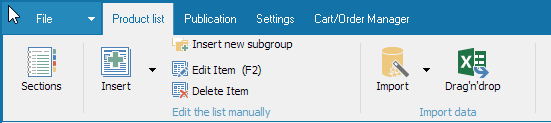
- The software gains a modern interface and becomes faster, more intuitive and logical in operation.
- All tasks are now solved more efficiently.
- All new functions will be available for this version of the software so make sure you use it.
- MS Office-style interface, neat and intuitive.
- Full UNICODE support.
- Catalog sections are now fully independent, each having its own set of characteristics.
- Formulas, calculations and constants for all numeric fields.
- Formatting of numeric fields.
- Multi prices with quick switching between different prices. Apply as many prices as you wish and switch between them in a couple of clicks!
- Quick activation and deactivation of fields, availability of private fields not for publication.
- Downloading and saving several times faster.
- New gallery of images and files in a single panel.
- Saving counterparty details while processing bills/proposals.
- Flexible background and text color setup in columns and rows reproduced in print documents.
- All templates are updated. Following the upgrade, we recommend that you use templates marked with prefix "3_".
- 'Code' field display management tool now available in the template.
- General template options are available in product chapter setting.
- Convenient project processing — open, save as, create, etc.
- New 'Read Only' regime for comprehensive software operation in the network (generation of catalogs, bills, proposals, etc.) without interfering with the administrator/editor.
- Stores - OpenCart correct processing of large photos
- VirtueMart - processing files and previews of additional files
- Multiple minor corrections and optimizations
- backup master eliminated (auto backup remains operational).
- global search in all sections eliminated.
- slide show eliminated.
- currency settings removed (please rely on formulas and formatting, which is a more flexible mechanism, all currencies will be saved as constants in conversion of the project)
- Media catalog update system is TEMPORARILY removed and will be restored in a new form approximately in two months.
- new format of storing settings. Old projects will be converted automatically.
- Android catalog project is updated for compatibility with new settings and features.
Change the target folder name in the Android catalog settings, for example, by adding letter 'B' to the existing path. A new project will be created automatically. Updated JDK will be downloaded automatically. - If you have been using MyBusinessCatalog, a reactivation will be necessary.
For free users: just get a new key and activate the software at first run.
A new test period will commence.
2017
- MyBusinessCatalog v 15.2
- New US-standard templates - Letter and Legal
We have developed (and included into the installation kit of MyBusinessCatalog) two additional template sets of the US format, such as Letter and Legal, each consisting of 32 templates.
Our templates are suitable for all document types such as price lists, catalogs, brochures, order forms and price quotes, etc.
- MyBusinessCatalog v 15.0
- New series of “02” templates
- Transparent and semi-transparent backgrounds
- Interactive PDF catalogs!
- active links leading to your social network accounts from the title page
- cross links to related products in the PDF
- a link to the current catalog version in the catalog
- links to external resources with enhanced product information (such as flypage in on-line shops)
- order form
- Barcode
- Display of all visible additional fields
- Correct formatting of options and attributes
- Automatic text scaling
- Strikethrough Pricing option
- 6 marketing sections, including price, previous price, automatic discount calculation
- Display of the “New”, “Hit”, “Special Offer”, “Sale” labels from the status in the product list or any other column
- Automatic mosaic creation from all product images (two main photos and all pictures in the additional files section)
- And a lot of other functions with about 170 options for template configuration (NEW only, with prefix '02')
- Product editor updated
- Instant editing mode
- Context menu is always within your reach
- Quick menu for column management
- Interactive menu for photo upload
- Both automatic and manual rotation of smart phone images
- “Action!” status added!
- Number of additional fields increased to 200
2016
- MyBusinessCatalog v 14.11
- Mini video catalogs for social networks - Facebook, Instagram
- A filter is added to the template list for a quick search
- Special templates are added for video catalogs for social networks
- Copy-Paste function is added to enable a product list paste from external sources
- The problem of dragging pictures from http websites with browsers, is solved
- The new ImagesFixer.exe, command-line launching for batch processing and error control in pictures
- MyBusinessCatalog v 14.9
- Added automatic catalog backup and restore.
- Printed template / PDf catalog / price list restore
- Some improvements and optimizations.
- MyBusinessCatalog v 14.7
- New feature
'catalog project' has been introduced.
Automatic generation and startup of separate MyBusinessCatalog catalogs. - User's media-catalog update performance has been enhanced.
- Android catalogs: QR-code generation bug has been fixed.
- Other improvements and optimizations.
- MyBusinessCatalog v 14.5
- Added templates for business proposals - Quotations and Invoices
- New option in the template setup for adding terms and conditions for the deal.
- HELP system for the administrative part is now available only on the Internet.
- Optimized report builder’s performance.
- Improved interface for adding related products.
- MyBusinessCatalog v 14.3
- MyBusinessCatalog v 14.1
- Catalog in HTML5 format Create an amazing HTML catalog for your products.
- MyBusinessCatalog v 14.0
- "Store in the pocket". Upload data to the Mobiliger platform (Android, Windows 8-10, WindowsPhone) - Depricate.
- Send notifications of your sales promotions to the applications.
- Free edition trial period - thirty days.
- Remote support for Flash videos.
2015
- MyBusinessCatalog v 12.1
- Added automatic optimization and photo resizing.
- This essentially speeds up the creation of new catalogs and prevents errors caused by lack of memory.
- Supports PDF/2A
- Publishing product catalog on SlideShare.Net
- MyBusinessCatalog v 12.0
- Added form for creating catalogs in the PowerPoint format.
- Added special wide-screen templates for saving catalogs from PowerPoint to video format.
- Detailed instructions on creating and publishing video catalogs on YouTube.
- Boost your website's SEO rating with YouTube.
- MyBusinessCatalog v 11.8


- Added export of catalogs to MS PowerPoint format (presentation)
--export to video format
--publish to Youtube
- MyBusinessCatalog v 11.7
- Added Turkish language
- Numerous minor bug fixes and improvements
2014
- MyBusinessCatalog v 11.6
- Correct import of multi-line descriptions
- Fixed appearance of photo in client's media catalog
- MyBusinessCatalog v 11.5
- Support for the latest version of OpenCart 2.0
- Support for the latest version of VirtueMart 3.0
- Completed implementation of SEO support in addresses like ../index.php/items/men/NNN for VirtueMart
- Added 4 new printable and PDF templates – 1 item per page and up to 8 images per page.
- Extra 6 photos can be added to the auxiliary files pane, and they will be displayed in this template!
More
- Season’s special: a FREE extra set of Christmas themes for decorating your catalog.
Christmas is right around the corner, and the season’s
mass purchases are about to explode. Use this season to boost
your sales, remind your customers about yourself: send them a
festively decorated catalog of your goods with special offers.
More
- MyBusinessCatalog Platinum v.11.2.0
- Simplified installation background images into templates for printable / PDF catalogs.
Make your catalogs bright, colorful, or vice versa emphasized strict! - Added 20 new templates with the prefix "01_ "
- The basic package includes 12 themes for background images
- You can download a free extra set of background images in a single setup file, ~ 100 pieces, 30 Mb
- Some enhancements and performance improvements
More
- Premium Templates
For the correct display of the Catalogs on the mobile devices, we have created special templates.
The kit includes the templates to view PDF documents on your smartphone (Android or iPhone), and on the tablets and iPad.
More
- MyBusinessCatalog Platinum v.11.0.0
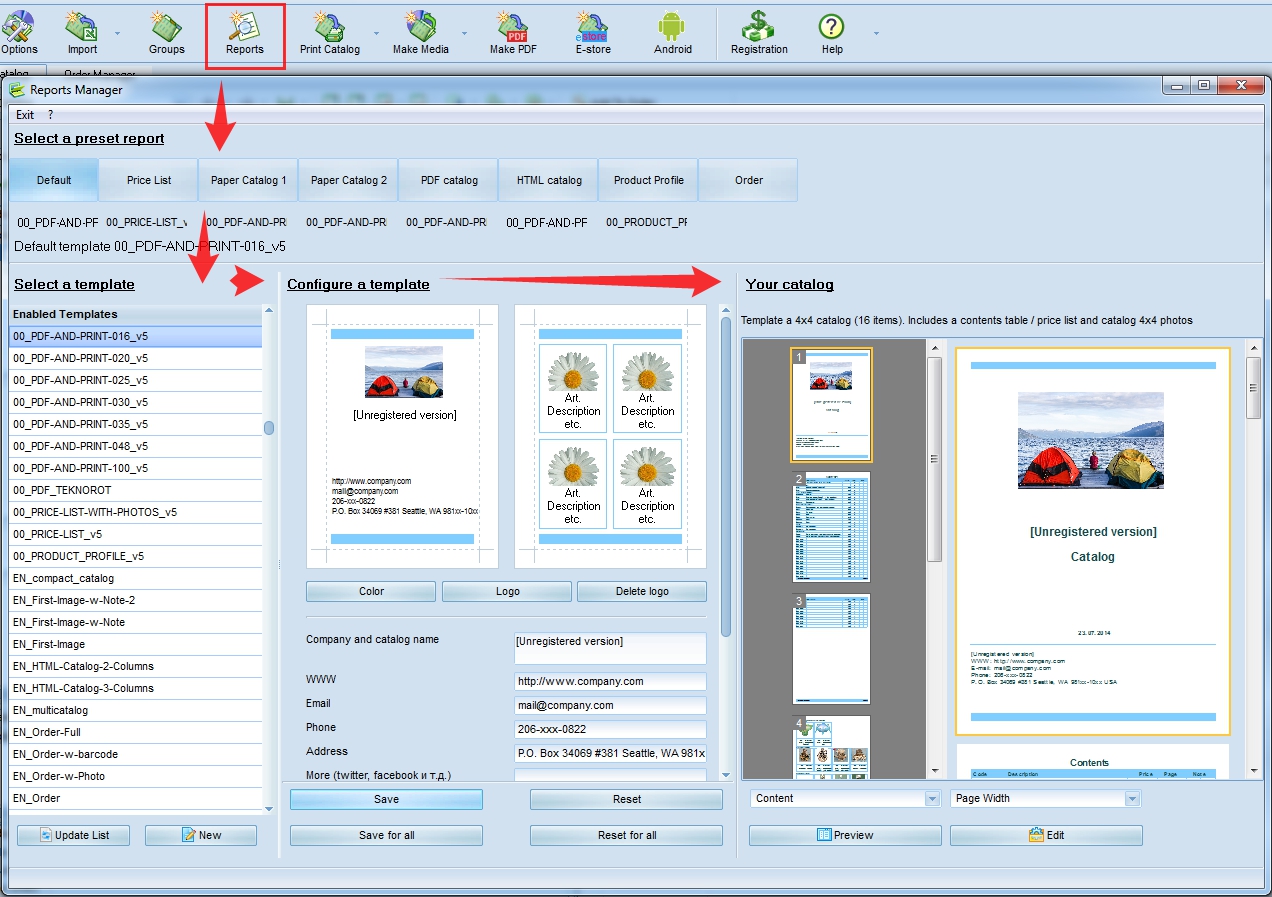
- The Report Manager has been completely changed (link to screenshot)
- Added 20 new templates with a "00_" prefix
- Configuration of reports/catalogs both individually and in the bulk
mode (name, logo, footer, content, etc for new templates only) without
having to edit them in the editor - Numerous minor bug fixes and improvements
- MyBusinessCatalog Platinum v.10.16.0
- Creating product catalog using Drag∓Drop
More
- MyBusinessCatalog Platinum v.10.13.1
Some enhancements and performance improvements
2013
- MyBusinessCatalog Platinum v.10.7.0
- Added Chinese language
MyBusinessCatalog - 此用於創建產品目錄的軟件現在已經能支持中文 - 簡體和繁體倆 - Bugs fixed
- MyBusinessCatalog Platinum v.10.3.0
- New Android catalog, faster, more comfortable, more functional
- Added demo-server for Apps uploading
- Added Indonesian interface language.
- MyBusinessCatalog Platinum v.10.1.0
- Added support for WebAsyst Shop-Script engine
- Added support for VirtueMart 2.0.x engine
- Updated scripts for OpenCart 1.5.x
- Sertification
 MyBusinessCatalog Platinum is Windows 8 Compatible
2012
- MyBusinessCatalog Platinum v.10.0.0

Creating mobile product catalogs for Android
New skins: win8, android, iOS, Office 2013
- MyBusinessCatalog Platinum v.9.8.2
- Added Belarusian language
- Added tables to product descriptions
- Added currency sign to price in the slide show
- Pause/Play state now remembered between sessions
- MyBusinessCatalog Platinum v.9.7.0
- Adding products to order from slide show
- Fixed error with referring to wholesale settings when ordering from product gallery
- Added support for TomatoCart engine
- Added support for CSCART engine
- Sending order directly to your server
- Online panel for processing orders.(login and password in the Demo: user). Integrates to the order submit system in the application
- Sending orders via Gmail (via secure protocol)
- Redesigned product editor
- Welcome page customization moved from the application's main window to the CD/DVD/FLASH card catalog creation wizard
- Changed encryption system. Please reenter your passwords for sending orders and updating catalog online.
2011
- MyBusinessCatalog Platinum v.9.4.0
- Uploading different prices for different customer groups in Joomla+VirtueMart.
- Added German printable/PDF templates.
- Added direct export of reports to Excel 97/200/XP.
- Added import of detailed descriptions from price lists.
- Fixed photo/gallery upload on program start with disabled welcome page.
- Optimized order operations (options, consolidation).
- When uploading to online store, products inherit subgroup photos if the product photos are not available.
- Radically improved search speed.
- MyBusinessCatalog Platinum v.9.3.0
- Added OpenCart engine (1.4 and 1.5)
- Added uploading additional properties: length, height, width
- Added full range of operations with product attributes (colors-sizes, options, etc. with allowance for different prices), using those when creating orders and uploading that data to online stores
- Uploading additional images (second image and all graphic files from the additional files pane (jpg, bmp, png) for VirtueMart and OpenCart)
- Uploading files from the additional files pane (VirtueMart only)
- Fixed error with image background when preparing photo for uploading to store
- Automatic update of utility scripts required for the operation of the store
Attention users of commercial version 9.2 and younger!
If on the second step of uploading data to your online store (Upload script) you get an error, that means that the program is unable to automatically replace the script with the new version.
Please do that manually or set permissions 777 to the script on the server
- User control panel online
The website now has user control panel, which shows all the details on your licenses. The registration requires a valid commercial key. Go
- MyBusinessCatalog Platinum v.9.2.0
- Optimized import module
- Autodetection of imported file formats by signature, allowing to download images from website when importing even from scripts
- Added selective photo upload to store
- Optimized uplading images to the Internet
- MyBusinessCatalog Platinum v.9.1.0
- Redesigned PDF handling routine+generating and uploading full PDF catalog to your website.
- Catalog print-out operations are now even more convenient.
- Added 4 new templates for both printing and PDF.
- An engine for playing Flash movies is integrated in the program; installing an external Flash player is not necessary.
- The total number of skins available for CD catalog has reached 228.
- Fixed appearance for price in the gallery with ordering system disabled.
- Added Italian interface language.
- Added Portuguese interface language.
2010
- MyBusinessCatalog Platinum 9.0.0
- Added uploading to online stores powered by VirtueMart (Joomla).
- Added uploading to online stores powered by ZenCart.
- Added 160 themes for osCommerce.
- Added 160 variants of decorating photos for all supported stores.
- Improved handling prices when importing.
- Restored editing in product profile.
- Improved speed and quality of processing graphics.
- Fixed summing up order by attributes.
- Updated Report Manager.
- Fixed a bug in advanced search in prices.
- Discontinued support for Windows 98/2000.
- MyBusinessCatalog Platinum 8.5.0
- Improved Stability under Windows 7-64
- Fixed the problem of importing files in subfolders.
- Optimized for running on Mobile platforms, added power saving mode.
- MyBusinessCatalog is now Intel® Silver Partner!
- New aero skins.
- Fixed the error that caused the gallery to appear wrong way when data was missing/artifacts in Windows 7.
- More informative hints on order submission success/failure.
- Faster performance.
- Modified PDF Export: Added full Unicode support, improved operating speed, reduced RAM space requirements.
- Speeded up gallery generation.
- Added setting custom fixed color for background image.
- Fixed the error with handling floating values in orders.
- Intelligent order correction with reference to bulk settings.
- Automatic reconnection on connection failure during initial configuration of online store.
- Displaying items marked as New above all other items.
- SEO optimization. Automatic compilation of tags meta name="Description" and meta name="Keywords" + option for specifying keywords for each item. See more.
- MyBusinessCatalog Platinum 8.1.0
- Added setting minimum order amount. Orders with a less amount will not be processed (see Tools-Options-Bulk Settings).
- Added Proxy settings for connecting to the online store.
- Font size setting
2009
- MyBusinessCatalog Platinum 8.0.0
- Generating fully functional online store.
- Custom catalog name when installing from CD/DVD/Flash.
- Specifying maximum number of files per folder when uploading update.
- Automatically blocking a wide range of errors when designing printable reports.
- Convenient operations over selected items (+shortcuts for them).
- Fixed error when working with related products with filter enabled.
- Printing selected items with filter enabled / the filter applies to printing.
- New functional template for printable/PDF catalog - multicatalog.
- Improved order submission routine. (If does not go through server, attempts
- to submit via e-mail client).
- Added 20+ new skins, including Office 2010, Windows 7, SnowLeopard and others - 180+ total
- Human-friendlier filtering results.
- Extended search functions, including diacritical-insensitive searching, etc.
- Searching detailed description files.
- Enabling / disabling order system.
- Showing / hiding prices.
- Showing / hiding images in order.
- Using dialogs in the report wizard.
- Custom format for the catalog update date string.
- Optimized uploading large volumes of data for updating CD/DVD catalog.
- Editing prices in order (enable / disable / password-protect.)
- Option for maintaining product list settings - checkboxes, selections, current item, folder open/close state.
- Improved importing your price lists to the program (adjusts automatically to get the best result, simplified requirements for importing images.)
- Added Czech interface.
- Added Dutch interface.
- Added Ukrainian interface.
- MyBusinessCatalog Platinum 7.5.0
- Adding (attaching) user's files to product items.( More)
- Adding related products.( More)
- Expanded import features; now you can import photos and additional files while importing price lists ( More)
- Support for adding photos in the PNG and BMP formats, also while importing.
- Fixed the bug when generating reports with partially selected items in a subgroup.
- MyBusinessCatalog Platinum 7.4.4
- Specifying product attributes when ordering (white, black, etc.)
- Number of additional fields increased to 15.
- MyBusinessCatalog Platinum 7.4.0
- Expanded capabilities for importing price lists to digital catalog
- Expanded help system
- Added Guide on Creating a Digital Product Catalog (MyBusinessCatalog Step-by-Step)
- Additional options on the welcome page
- Fixed error when using the multi-currency catalog
- MyBusinessCatalog Platinum 7.3.0
- Option for displaying subgroup photograph when product photo is not available (more)
- Smart sorting
- Bugs fixed.
2008
- MyBusinessCatalog Platinum 7.2.0
- Additional information when entering item to order
- Added backup/restore wizard
- +moving/restoring groups of products for sharing workload when creating catalog
- Unicode support (the product list)
- Displays number of subgroups and items in groups
- Optimization/additional quick search parameters
- Improved built-in list editor. (Press F2 to edit, then use the cursorkeys and Enter as in a spreadsheet editor)
- Custom field names for core fields -ID-name-price at your discretion
- Export of product list to HTML, RTF and ANSI/UNICODE
- Additional templates for printable catalogs - compact printing by subgroups and a 4 by 5 photos template
- Setting custom splash image when no photo available - instead of the default label (for example, your company's logo)
- Fixed error in the Smart-Price mode and with expanding product list to full screen
- Fixed error in copying catalog from CD to user's computer
- MyBusinessCatalog Platinum 7.1.0
- Added importing data from MyBusinessCatalog Gold v.5-6
- Choosing catalog print template is now available to end-users.
- Added automatic proxy configuration.
- Fixed minor bugs.
- MyBusinessCatalog Platinum 7.0.0
- Changed data format
- Added product gallery for product groups
- Improved functionality of catalog update engine (Compatibility with Gold edition maintained.)
- MyBusinessCatalog Gold 6.5.0
- Customizable product profiles
- New product attributes
- Visual effects designer
- Marking ordered items
- MyBusinessCatalog Gold 6.4.2
- Configuring scheduled updates
- Identifiers of different catalogs going under same brand
- exporting to OpenOffice formats
- MyBusinessCatalog Gold 6.4.0
- Flash (*.swf) movie support
- PDF catalog creation + customizable templates
- HTML catalog creation + customizable templates
- Refreshed reports
- Refreshed skins
- More formats for saving order data
2007
- MyBusinessCatalog Gold 6.3.1
- Now compatible with Windows Vista.
- Optimized Upload/Update options.
- Built-in migration wizard for moving Catalog from CD to end-users' computers (Available only when launching Catalog from CD/DVD).
- Fixed minor errors
- MyBusinessCatalog Gold 6.2.2
- Printed order and e-mail now include information on applicable discounts (parameter mbcOrderDiscount).
- Items and groups/subgroups can be highlighted with color (to be used in reports mbcNodeColor).
- Printed orders can now include order numbers (parameter mbcOrderNumber).
- Built-in FTP on the Upload form.
- Catalog data updates can now be protected with password(s) (e.g. for premium subscription or for privileged clients).
- User's images inserted in the forms will reflect your corporate style better.
- Major reports updated for greater flexibility with displaying data.
- Background adjusts automatically to match image color.
- More advanced and friendly search; Drag&Drop supported completely for almost all operations.
- Expanded item editing capabilities.
- Added new items to products' context menu.
- Hierarchical structure and merging orders.
- Consolidating orders from diverse branches/departments of the same customer.
- Saving/exporting and e-mailing orders in the XML format.
- Displaying forms in the AlfaBlendAnimation mode (Options-Colors)
- 149 themes available additionally
- Fixed minor errors
- MyBusinessCatalog Gold 6.0.0
- Added skins support.
- Standard edition includes 15 skins; over 120 themes available additionally
- Modern ergonomic interface.
- Extended customer information (payer information, delivery address).
- Order window now has calculator.
- Renewed report designer.
- Printing catalog by 2 pages on 1 sheet and 1 page on 2.
- Fixed minor errors.
- Added Portuguese language (Pt-br).
- Added Hebrew language.
- MyBusinessCatalog Pro
MyBusinessCatalog version PRO is no longer available.
2006
- MyBusinessCatalog Gold 5.2.0
- Added support of GIF format
- Mosaic mode for nested groups of products
- Improved search system
- Order lock system
- History of moves between positions when viewing
- More ergonomic interface
- Fixed minor errors
-News
Top-rated by the authoritative software magazine,
3d2f.com!
3d2f.com's editors nominated MyBusinessCatalog as the best program in its class!
- MyBusinessCatalog Gold v.5.1.0
- Added data compression routine for online updates
- Save time and data traffic 10-12 times!
- Optimized updating of photos and descriptions
- Added the capability of selecting products to be shown in slide show
- Fixed minor errors
- MyBusinessCatalog Gold v.5.0.7
- Added order manager
- More intuitive interface for working with orders
- MyBusinessCatalog Gold v.5.0.6
The updated version of MyBusinessCatalog Gold is now available.
- Enabling displaying item description under the item photograph.
- Option "Hide item ID". Available in the view mode.
- Added table appearance options.
- Added two parameters for generating reports
- Automatic expansion of group name to free cells on the right
- Custom alignment of columns
- Quick search (no opening of the search panel. (View mode only.)
- Displaying custom selected branch in the order form.
- CSV format for attached order files.
- Prompting customer to complete the additional field on submitting order.
- Fixed minor bugs.
- MyBusinessCatalog Gold v.5.0
MyBusinessCatalog Gold 5.0 has been released!
- Support of subgroups and subfolders
- Additional item properties
- Sending order as attachment for automatic parsing (format of your choice)
- Saving / sending catalog via e-mail in PDF
- Prompting customer for additional information during ordering.(Discount card, Tax ID, etc.)
- Advanced search features
- High operation speed with large (several thousands) lists of items in the same group
- Extensive information on sales branches.
2005
- MyBusinessCatalog Pro v.4.6.3
- Added Spanish interface
- Fixed minor bugs.
- MyBusinessCatalog Pro v.4.6.2
- Added French interface
- MyBusinessCatalog Pro v.4.6.1
- Added Germany interface
- Fixed minor bugs.
- MyBusinessCatalog Pro v.4.5.7
- Added configuration options for wholesalers.
- Added capability of adding an individual subject to order e-mail message.
- Added capability of inserting additional addresses for sending orders for large organizations.
- Fixed proxy servers problems.
- Fixed problems related to running CD catalog on some CD drives.
- Fixed other minor problems.
2004
- MyBusinessCatalog Pro v.4.5.0
- Added group setup and CD creation wizard.
- Settings and data entry within the same interface.
- Discount settings.
- Multi-currency catalog settings.
- Built-in welcome window editor.
- New design.
- MyBusinessCatalog Pro v.4.1.0
- Built-in item lists import wizard.
- Supports the following data formats:
Access, Excel, DBF, XML, TXT, CSV - Allows supplying of 5 additional data fields.
- Custom field names for each category.
- Supports printing barcodes in reports.
- Graphic splash screen for each group of items.
- Fixed minor bugs and shortages.
- MyBusinessCatalog Pro v.4.0.0
- Added CD-Burn options.
- Added search options.
- Added interface functionality.
- MyBusinessCatalog Pro v.3.1.0
- Redesigned document print-setup system.
- Added the Designer for editing and creating individual report forms.
- Added updating via proxy server support.
2003
- MyBusinessCatalog Pro v.3.0.1
- Introduced the XP-like appearance. More convenient and intuitive user-friendly interface.
- Fully automated data upload via the Internet.
- Automatic image file optimization before uploading the updates.
- HTML-format of the Welcome page for your clients.
- MyBusinessCatalog Pro v.2.2.3
- Improved performance in the slide-show mode.
- Added functionality for automatic switching of goods in the slide-show mode.
- Added interface configuration functionality.
- MyBusinessCatalog Pro 2.2.1
- Added functionality for updating the additional descriptions via the Internet.
- Added capabilities for using and configuring the Catalog's splash screen. On this screen of 400x200 pixels you can place any information to be displayed to your clients while loading the program.
- MyBusinessCatalog Pro 2.2.0
- Substantially simplified the product list, images and descriptions entry procedure. When entering product information, in the Configurator you should only describe the groups of products and icons or splash screens that correspond with them. The main information entry is to be done right in the Catalog program. To access the editing mode, use the Configurator's menu 'Start catalog'-'Editing mode'.
- Lists of products can be entered right in the Catalog program.
- Full-featured text editor is available for editing the additional descriptions.
- Added special toolbar for adding images; it allows selecting any JPEG files on your hard drive or acquiring images from the external hardware (scanner, digital camera, etc.)
- When viewing the catalog, you can set the priorities for displaying the information (photos or descriptions).
- Organizations that are not planning to use photos and product descriptions can select the mode 'Use standard version'. When this mode is selected, your users will not see blank description window or the 'No image' screen instead of the photos, but rather the list of products will be stretched to fit the entire window.
- Added selection of the product name display format in the bottom section.
2002